Workflow demonstration · AI Document Intake
From unread attachment to actionable reply.
A document workflow that reads incoming PDFs, extracts the details that matter and replies in the original email conversation.
 n8n
n8n Claude
 Gmail
Gmail JavaScript
What this demonstrates
- PDFs read automatically
- Structured replies in thread
- Usage limits before AI processing

The gap this closes
Most workflow automation stops exactly where the work gets hard. A PDF lands in an inbox and a person still has to open it, read it and decide what happens next. Moving rows between applications is easy. Reading the document and making the call is the part that stays manual, and putting a model inside the workflow is what closes that gap.
How the pipeline is built
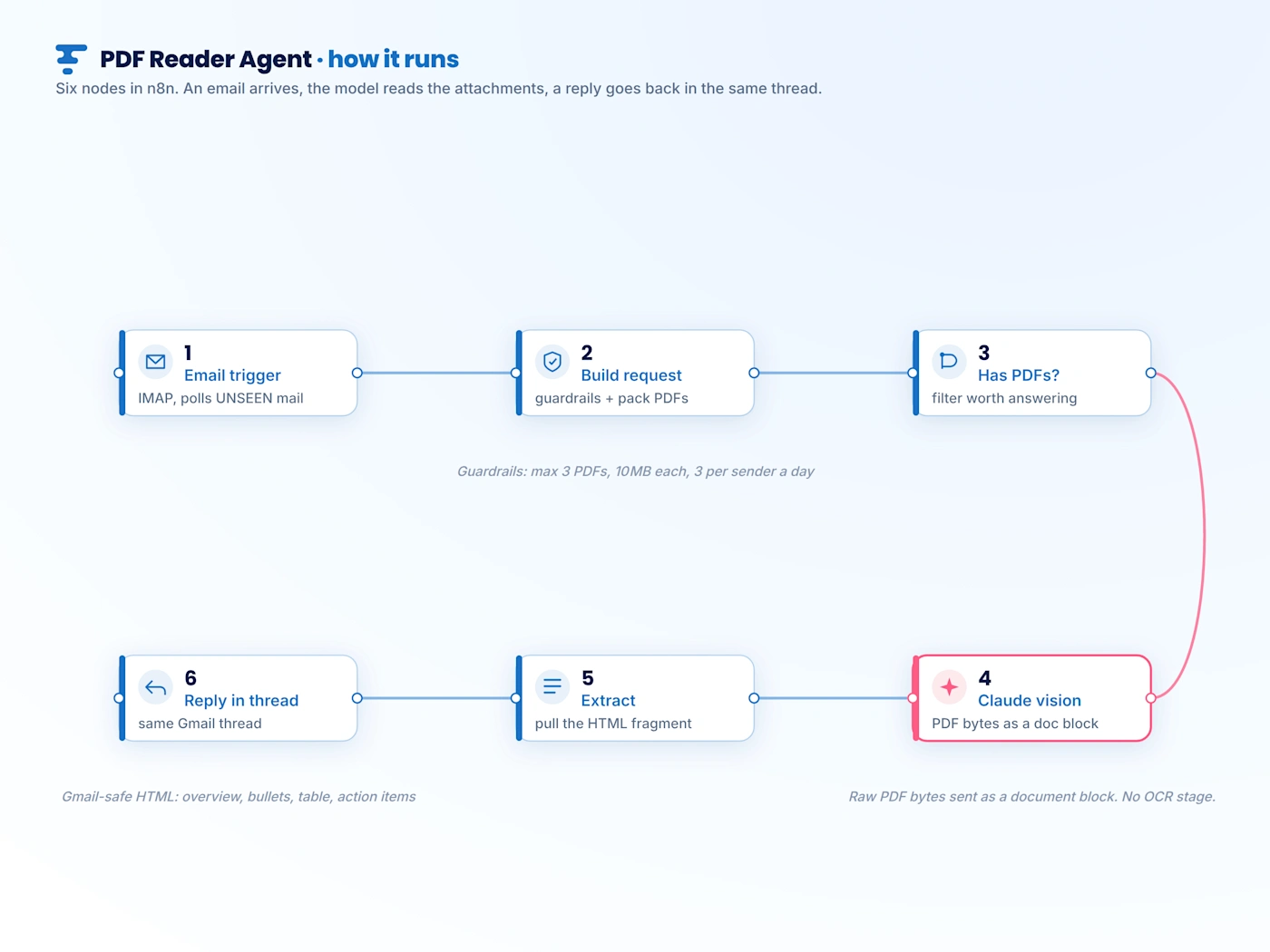
Six nodes end to end. An email trigger polls for unseen mail. A build step applies the guardrails and packs each PDF for the model. A filter drops anything not worth answering. The model reads the raw PDF bytes. An extract step pulls the response fragment out. A final step replies inside the original conversation, usually within a couple of minutes.
Vision instead of a recognition stage
Each PDF is passed to the model as a document content block rather than as scraped text, so scanned and photographed paperwork is read the same way a typed file is. That removes an entire text recognition stage from the build, and with it the accuracy cliff that recognition hits on a poor scan. One fewer moving part to maintain, and better results on the messy inputs that matter most.
Guardrails first
The server is a fixed cost but the model is not, and a public mailbox invites a stranger to send a three hundred page document. The build therefore caps three things before anything reaches the model: how many attachments are read per email, how large an attachment may be, and how many messages one sender may submit in a rolling day. A spend ceiling on a dedicated key means a runaway can never reach client work.
A strict output contract
The model is not asked to summarise. It is asked to return one fixed shape: a single line overview, a set of bullets for each attachment, a table when there are line items, and a list of action items when it finds any. A predictable structure is what lets the reply drop straight into an email thread without post processing, so the sender receives something that reads as though a person answered.
The same pattern, wider
The demonstration reads documents from an inbox, but the shape generalises to document heavy back office work. Invoices, purchase orders and contracts follow the same spine: intake, read, extract into structured data, route or approve with a human step where the decision warrants one, then reply. Only the endpoints change.
How to engage with us
Good work starts
with a conversation.
Tell us what you want to build or improve, and we will come back with a practical next step rather than a sales sequence.
Teams we have worked with
Read client feedback ↗